Why MacroFactor Is the Only Food Logging App I Recommend
I've used MacroFactor since it launched in 2021. Every client in our coaching programs uses it. And I'd recommend it even if I weren’t an affiliate.
Here's what MacroFactor does that the other apps don't (hint: it’s way more than a food logger).
Why I use MacroFactor
I'm an engineer. In engineering you don't guess at your inputs and then act surprised when the output is wrong. You measure it, you check that against what you predicted, and you fix whatever's off.
Most nutrition apps don't work that way. You punch in your age, height, weight, and activity level. A formula built on population averages spits out a calorie number. If you use that calorie target and fail to reach your goals, it’s because the target wasn’t based on your actual daily metabolism (“expenditure”), or how many calories you actually burn.
Your metabolism isn't broken. It's adapted to what you've been eating and doing. You just don’t have visibility into it without the right data.
MacroFactor was the first app I used that closed the loop. It takes what I logged, compares it against what my weight trend actually did, and works backward to calculate my real energy expenditure. It updates every week, based on me, not on a formula or activity tracker or any other imprecise method.
It's also the one tool we ask clients to use in our program (Eat More Lift Heavy). We can't coach somebody to eat more without gaining fat, or to adjust calories precisely during a fat loss plateau, or to quickly recover after a calorie deficit, if neither of us knows how many calories they’re actually burning.
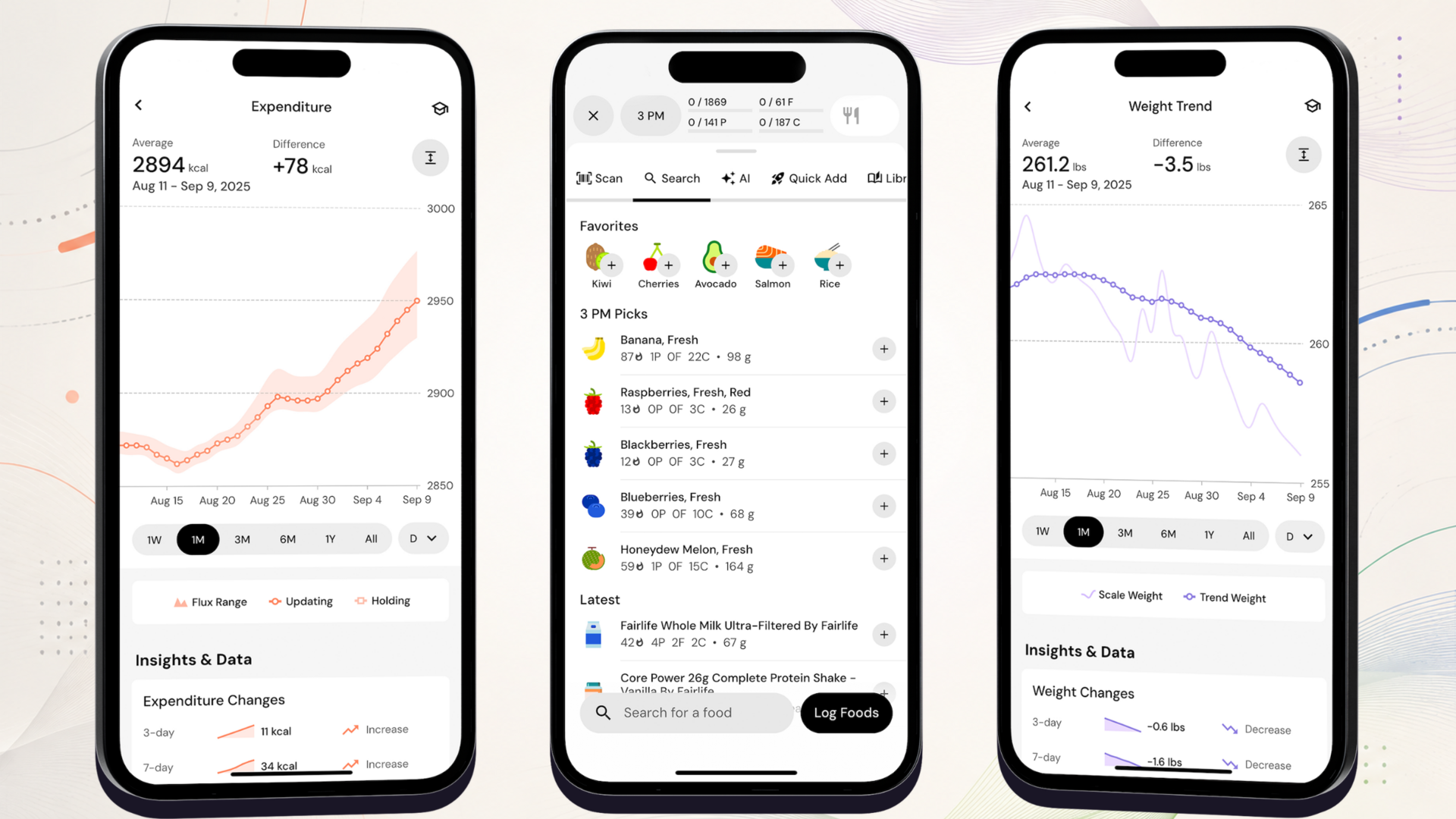
How it figures out your metabolism
Most tracking apps estimate your calorie and macro targets based on a formula. MacroFactor is unique in that it calculates your true, dynamic metabolism (how many calories you’re burning each day) based on your food intake and how your weight is changing.
You log food and weigh in. Daily weigh-ins and honest logging. That's the whole job.
It reads your weight trend. Today's number on the scale gets ignored in favor of a smoothed trend that filters out fluid (water/glycogen), sodium, inflammation, and hormonal noise.
It works backward to your expenditure. What you ate, checked against how your weight actually changed, tells it what you're really burning.
Your calorie & macro targets update. Every week, automatically, in whatever direction your goal needs.
This is why plateaus feel different once you're using the app.
When your expenditure drops during a calorie deficit (and it will!), you see how it changes on the Expenditure chart instead of panicking or thinking your metabolism is somehow broken.
And when you start feeding yourself properly and it climbs back up, you see that too. I've never found a better argument against eating too few calories :)
It's also why I stopped paying attention to the calorie burn on my watch. Wearables are up to 80% inaccurate when it comes to calorie tracking. MacroFactor works it out from what your body actually did.
One big caveat: The algorithm is only as smart as your logging. Partial logging is the biggest reason people tell me their expenditure number looks “wrong” so don’t enter partial days (blank is better than partial in fact).
My favorite features of MacroFactor
MacroFactor has changed a lot since I first started recommending it.
Some of my favorite features:
AI-based photo logging. Point your camera at the plate and it identifies the foods. You can shoot the whole meal in one photo, food scale included, and it will even read the weight right off the display. Always check the portions before you save, because it's just estimating.
Photo plus text for restaurant meals. Forgot to log at dinner but you still have the receipt? Snap the receipt and add context in text, like "only ate half the pasta, extra mayo."
Easy recipe import. Paste in a recipe URL and it builds the ingredient list for you. Or photograph a page out of a cookbook, or somebody's handwritten card, and it will pull in the ingredients and the steps.
A verified food database. Entries are curated instead of crowdsourced, so you're not picking between 9 versions of the same exact food like on some other apps.
Coached or collaborative mode. Let the algorithm run everything, or set your own macro split and let it manage calories only. If you've been lifting and tracking for a while, collaborative is a great option to tweak the app for things like weekend refeeds. There’s a “manual” mode too for something like a rapid fat loss phase.
Dynamic maintenance phases. If you’re looking to stay at maintenance, once you're within about 1.5 lbs of your goal, it holds you there with small adjustments up or down. Most people lose their progress coming out of a diet and regain all the weight, but with MacroFactor you can recover straight to your maintenance calories and adjust as it climbs up without overshooting or regaining body fat.
Nutrition targets and contributors (fiber and micronutrient tracking). The app automatically sets micronutrient and fiber targets based on your personal info. You can tap a nutrient and see which foods are actually contributing to it over the past week or month. And view the averages across all macros, micros, and fiber. I use it for protein distribution, and for the fiber, iron, and magnesium, among others.
No shaming (adherence neutral). One more thing worth mentioning is that the app doesn't shame you. No red numbers, no warnings, no “educational” message when you miss your calories. It works best when you’re honest about the data but doesn’t judge the result as “good” or “bad”, only helps you adjust to keep moving toward your goal.
Who should NOT use MacroFactor
This isn’t right for everybody. Who should NOT use the app?
You have a history of disordered eating. Daily weigh-ins and calorie logging can make that considerably worse. Talk to somebody who knows your history before you download anything. There are ways to make progress without tracking, and I'd rather you use one of those that work best for you.
You already know you won't log. This approach requires consistent data. Sporadic logging gives you an expenditure number that's wrong, which is worse than having no estimate at all. If tracking is the thing that keeps holding you back, solve that first. We have an app called Fitness Lab built for this.
You want the app to make your decisions. MacroFactor tells you what's happening, but it won't tell you whether you should be cutting right now, whether your training is the bottleneck, or what to do when your energy is low and your sleep is a mess. No app is going to answer those for you. That’s where the podcast and coaching can help.
How to get a 2-week free trial
Two weeks is the minimum time needed to estimate your expenditure accurately, so what better way to check out the app than with a 2-week free trial using our code WITSANDWEIGHTS (the default trial is only 1 week).
Download the app at onelink.to/macrofactor. It'll send you to the right app store for your phone.
Answer yes to the affiliate question. During setup, right before you subscribe, you'll see "Did you learn about us from an affiliate?" Tap yes and watch the trial go from 1 week to 2.
Enter WITSANDWEIGHTS on the next screen. It won't change what you pay after the trial.
Log everything for two weeks and don’t change your eating yet. This is the part people rush through! Don't touch your intake yet. Let it gather data and give you an honest expenditure number. The first step to change is awareness of your current diet.
Frequently asked questions
-
No. What you pay after the trial is identical whether you use my code, somebody else's, or none at all. MacroFactor doesn't run sales or discounts. The only thing a code changes is your trial length (2 weeks instead of 1). If you subscribe with our code WITSANDWEIGHTS, you’re also supporting the podcast!
-
As of 2026, it's $11.99 a month, $47.99 for six months, or $71.99 for the year, which works out to about $6 a month. These are US prices, so other countries may have different pricing. There's no free tier. Check the app store for current pricing, since it can change.
-
Yes! The logging itself is faster than anything else out there, and the copy-paste and AI photo-logging features make it even faster. What it won't fix is your relationship with tracking. If logging makes you anxious or obsessive, more efficient logging isn't the answer for you. However, we’ve seen many users start to enjoy logging after realizing they can actually achieve their goals (i.e., lose fat) when nothing else seemed to work.
-
Other food logging apps record what you ate and leave it there. MacroFactor takes what you ate and uses it to figure out what your metabolism is doing, then adjusts your targets. This is a massive difference because you know exactly what to eat for calories and macros to maintain the rate of fat loss (or muscle gain) you’re aiming for.
-
The algorithm works better with daily data, because it's watching the trend rather than any single data point. That said, weighing daily is a behavioral question as much as a technical one. However, research consistently shows that more frequent (especially daily) weigh-ins are associated with not only successful fat loss but maintaining those results (avoiding weight regain).
-
That's their separate training app, with its own subscription (you can still get a free trial with our code WITSANDWEIGHTS). Everything above is about MacroFactor Nutrition, which works completely on its own. If you already have a training program you trust, keep running it.
What’s next after downloading MacroFactor?
MacroFactor will tell you how many calories youre burning. It won't tell you whether to eat more, whether your training is the real bottleneck, or why you struggled with your last 10+ diets :)
That part is what we can help with. If you want the full system, Eat More Lift Heavy is our 26-week coaching program for lifters over 40 who are doing the right things and still stuck with fat loss.
If you’re looking for free content to get started learning about fat loss, muscle gain, and body recomposition, we have 500-plus podcast episodes on metabolism, expenditure, and what to do when the scale quits moving.
Questions about setting the app up? Send me a message and I’ll help you out!